















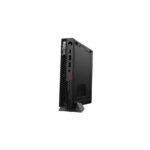

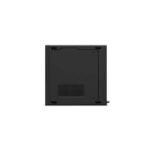


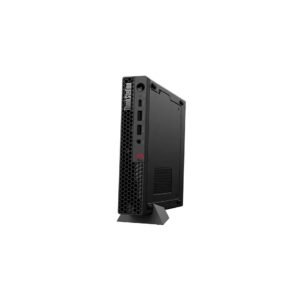
Lenovo ThinkStation P3 Tiny Gen 2 Tower Workstation | Intel Core Ultra 7 265T | 4GB NVIDIA A400 | 16 GB | 512GB SSD | Win11 Pro | 3Year | 30K5002VAX
5,577.00 AED
- Intel® Core Ultra 7 265T, 20C (8P + 12E) / 20T, Max Turbo up to 5.3GHz, 30MB Intel Smart Cache
- 16GB SODIMM DDR5-5600 Non-ECC
- NVIDIA® RTX A400 4GB
- 512GB SSD M.2 2280 PCIe
- Windows 11 pro
- 3 Year Warranty
- 1.4 kg
Free Shipping
Zero delivery charges, maximum convenience.
If You Have Any Query,
Please Contact Us
Our Sales Specialist
Name: Anjalina
Physical Store Available
100% Genuine
24/7 Support
Description
The Lenovo ThinkStation P3 Tiny Gen 2 is a compact, versatile workstation designed for professionals who need powerful computing in a minimal footprint. Despite its small form factor, it’s capable of handling demanding tasks across fields like engineering, architecture, content creation, and financial analysis. Here’s a detailed breakdown of its features:
1. Compact and Space-Saving Design
- Tiny Form Factor: The Lenovo ThinkStation P3 Tiny Gen 2 is designed to fit into nearly any workspace with a footprint of just 1 liter. This makes it ideal for environments where space is limited, like retail, medical offices, and finance desks.
- Flexible Mounting Options: It can be mounted behind a monitor, under a desk, or on a wall with VESA mounting capabilities, enhancing its versatility and keeping workspaces clutter-free.
- Durability: Built to withstand harsh environments, it meets MIL-STD 810H standards, ensuring durability in various conditions, from vibration to temperature extremes.
2. Processor and Performance
- Intel Core 13th Gen Processors: Configurable with up to Intel Core i9 CPUs, the ThinkStation P3 Tiny offers high processing power for multitasking and demanding applications.
- High Memory Capacity: Supports up to 64 GB of DDR5 RAM (4800 MHz), enabling efficient handling of memory-intensive tasks such as simulations, rendering, and complex calculations.
- Fast Storage: Configurable with up to 2 TB of PCIe Gen 4 NVMe SSD storage, providing rapid read and write speeds for fast access to large files and quick application load times.
3. Graphics Options
- NVIDIA A400 Discrete GPU: For enhanced graphics performance, the Lenovo ThinkStation P3 Tiny Gen 2 Workstation can be configured with an NVIDIA A400 GPU, offering 4 GB GDDR6 memory, capable of handling 3D modeling, CAD, and visualization workflows.
- Integrated Graphics Option: For less intensive graphical tasks, Intel UHD integrated graphics can be used, providing efficiency for general business applications and optimizing energy consumption.
4. Connectivity and Ports
- Versatile Port Selection:
- Front Ports: Features USB-A, USB-C, and audio jack, providing easy access to commonly used connections.
- Rear Ports: Includes multiple USB-A, HDMI, and DisplayPort outputs for connectivity to multiple monitors and external devices.
- Multi-Monitor Support: Can drive up to four independent displays simultaneously, making it ideal for setups that require expansive screen real estate, such as financial trading or design work.
- Ethernet and Wi-Fi Options: Comes with Gigabit Ethernet for stable wired connectivity, and optional Wi-Fi 6E for high-speed wireless networking, reducing latency and improving productivity in collaborative environments.
5. Expandability
- Modular Design: Despite its small size, the Lenovo ThinkStation P3 Tiny Gen 2 offers modular expandability with options for storage and memory upgrades, allowing users to scale the workstation as their needs grow.
- Tool-Free Access: Easy access to internal components for upgrading or maintenance, making it efficient for IT teams or end-users to manage and upgrade the device as needed.
6. Security Features
- ThinkShield Security Suite: Equipped with Lenovo’s ThinkShield suite, offering layers of security, including:
- Trusted Platform Module (TPM) 2.0: Encrypts data at the hardware level, enhancing data security.
- Smart USB Protection: Restricts USB port functionality to prevent unauthorized access to data.
- Kensington Lock Slot: Physical security to prevent theft in shared or public workspaces.
- Self-Healing BIOS: Protects against BIOS-level threats by automatically recovering to a previous state if the BIOS is compromised.
7. Energy Efficiency
- ENERGY STAR Certified: Compliant with ENERGY STAR standards, the Lenovo ThinkStation P3 Tiny Gen 2 is designed for energy efficiency, reducing its environmental impact and lowering power costs for businesses.
- Low Noise Operation: Engineered for quiet operation, ensuring it won’t disrupt work environments even under heavy loads, making it ideal for noise-sensitive settings like medical offices or design studios.
8. Operating System and Software
- Windows 11 Pro: Provides a professional-grade operating system with enhanced security, productivity features, and compatibility with enterprise software.
- ISV Certification: Certified with various industry-leading software applications (e.g., AutoCAD, SolidWorks, and Adobe), ensuring stability and compatibility for professional applications critical to workflows in design, engineering, and more.
9. Remote Management and IT Solutions
- Lenovo Vantage: Offers tools for system optimization, driver updates, and diagnostics, making it easy to manage and troubleshoot.
- Optional Lenovo Device Manager: Lenovo ThinkStation P3 Tiny Gen 2 Allows IT administrators to manage, monitor, and control devices remotely, ideal for large-scale deployments or businesses with remote employees.
Processor
| Processor Name | Intel® Core Ultra 7 265T |
| Processor Speed | 5.3 GHz |
| Processor Core | 20 Cores |
| Processor Cache | 30 MB |
Memory
| Memory Type | DDR5 Memory |
| Standard Memory | 16 GB |
Internal Storage Devices
| SSD Storage | 512GB SSD |
Graphics
| Graphics Card | 4GB NVIDIA A400 |
Power
| Power Supply Type | 170 W |
Dimensions And Weight
| Weight (imperial) | 1.4 kg |
| Product Dimensions (metric) | 179 x 182.9 x 37mm |
General
| Warranty | 3 Year |
| Operating System | Windows 11 Pro |
| Question | What is the Lenovo ThinkStation P3 Tiny Gen 2 Workstation? |
| Answer | The ThinkStation P3 Tiny Gen 2 is a compact professional workstation that delivers workstation-class performance in an ultra-small form factor. |
| Question | Who should consider the ThinkStation P3 Tiny Gen 2? |
| Answer | It is ideal for engineers, architects, designers, developers, financial analysts, and professionals who need reliable performance in limited workspace environments. |
| Question | What are the key advantages of a tiny workstation? |
| Answer | A tiny workstation saves desk space, reduces clutter, and offers professional-grade performance while maintaining deployment flexibility. |
| Question | Is the ThinkStation P3 Tiny Gen 2 suitable for professional workloads? |
| Answer | Yes, it is designed to support demanding business, engineering, design, and technical applications. |
| Question | Can the ThinkStation P3 Tiny Gen 2 run CAD and BIM software? |
| Answer | Yes, it is well-suited for CAD, BIM, drafting, and other professional design applications depending on the configuration. |
| Question | Is the ThinkStation P3 Tiny Gen 2 a good choice for hybrid and remote work environments? |
| Answer | Yes, its compact footprint and professional capabilities make it an excellent option for modern workspaces. |
| Question | ow does the ThinkStation P3 Tiny Gen 2 compare to the ThinkStation P3 Tower? |
| Answer | The P3 Tiny Gen 2 focuses on compact deployment, whereas the P3 Tower provides more room for graphics, storage, and future expansion. |
| Question | What industries commonly use compact workstations like the ThinkStation P3 Tiny Gen 2? |
| Answer | Industries such as architecture, engineering, construction, healthcare, finance, education, and media production frequently use compact workstations. |
| Question | Is the ThinkStation P3 Tiny Gen 2 a good long-term investment for businesses? |
| Answer | Yes, its professional reliability, security features, and compact design make it a strong choice for organizations seeking efficient workstation solutions. |
| Question | What should businesses consider when choosing a compact workstation? |
| Answer | Businesses should evaluate application requirements, graphics needs, available workspace, future scalability, and deployment flexibility. |

Reviews
There are no reviews yet.